
Bring a new supplier on board
Follow a supplier from the first request through visible risk checks and approval to the review task that begins three months before contract expiry.
Explore the supplier onboarding workflowSolutions
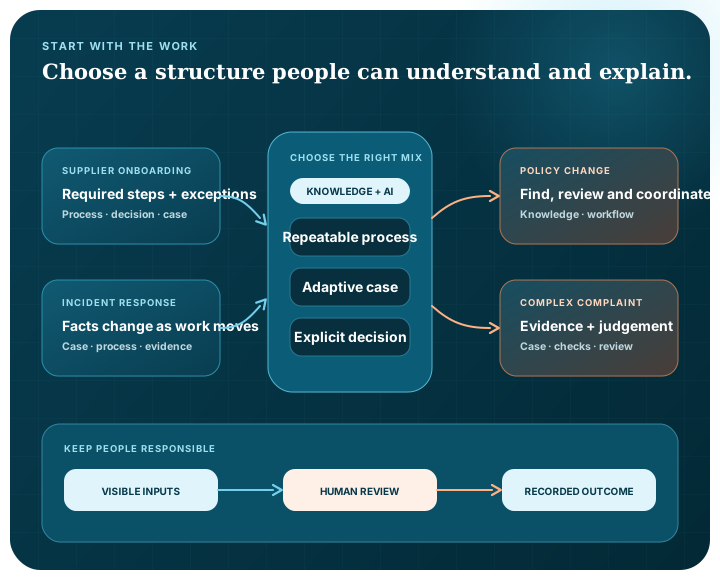
The best place to begin is not a feature list. Begin with a piece of work people understand, then decide where search, AI, a process, a case or a decision can genuinely help.
Guided scenarios
These scenarios show how the pieces can divide the work. They are starting points for evaluation, not claims about a particular organisation or completed customer deployment.
Follow a supplier from the first request through visible risk checks and approval to the review task that begins three months before contract expiry.
Explore the supplier onboarding workflowFollow a changing service incident through structured triage, a visible response decision, human-approved containment, recovery and post-incident review.
Explore the incident response workflowContinue an approved policy through impact mapping, team assessments, implementation work, an exception and the effective-date decision.
Explore the policy implementation workflowWork through conflicting accounts, changing scope, human findings, an independent decision and accountable follow-up.
Explore the complaint investigationA practical pattern
The same questions help whether the work comes from operations, technology, knowledge management or another part of the organisation.
Choose a real task, process or case with a clear reason to improve it.
Identify the documents, systems, people and access rules the work depends on.
Separate the repeatable route, the changing case and the explicit decisions.
Use a supported model only where it has a useful, bounded job and a visible input and result.
Put review, approval and professional judgement where accountability needs to remain human.
Choose your perspective
See how the platform connects knowledge and work while keeping operating choices and accountability visible.
View the leadership perspectiveReview deployment, system boundaries, access, connections and the questions to ask before evaluation.
View the technical buyer perspectiveExplore how models, knowledge, connections, workflows, processes, cases and decisions are configured.
View the developer perspectiveA private demonstration can use a suitable example from your environment without asking you to send confidential information through the website.