
Decision tables
Define inputs, outputs, rules and supported hit policies in a form that can be read and reviewed.
Decision management
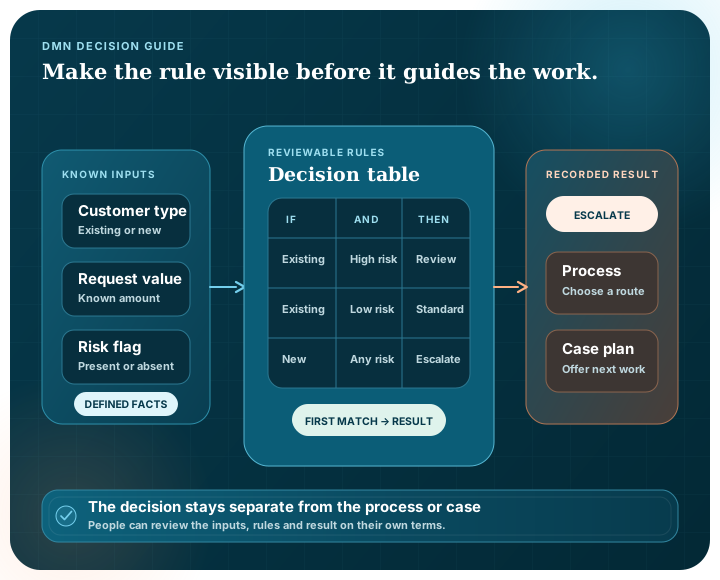
When a rule affects who is eligible, where work is routed or when something must be escalated, people should be able to see it. Pūnaha keeps decision logic separate from the process or case that uses it, so the rule can be reviewed on its own.
Why separate decisions
Imagine a service request that must be routed by value, risk and location. The process explains what happens before and after the routing point. The decision explains how those three inputs produce a destination.
Keeping the rule separate makes change easier to discuss. A policy owner can review the logic without tracing an entire process diagram, and the same decision can be used from more than one process or case.
A decision in practice
Be clear about the result the decision is expected to return.
Specify the information the rule needs and what happens when it is missing.
Use supported conditions or a decision table instead of scattering the logic across code and routing paths.
Call it from a workflow, BPMN-based process or CMMN-based case with mapped inputs and outputs.
Retain the output with the surrounding execution or case state that used it.
What Pūnaha provides
Define inputs, outputs, rules and supported hit policies in a form that can be read and reviewed.
Use conditions and business-rule modules inside a controlled workflow version.
Pass process data into decision logic and return the result to the running process.
Use a decision from a case and map the output back to case information or subsequent work.
Keep the result with the run or case in which it was used.
Follow a decision with approval when policy, consequence or professional judgement requires a person.
Working with DMN files
Pūnaha can preview supported DMN XML, create or update an editable draft, and export supported decision logic as DMN.
The import preview shows what Pūnaha recognised and what needs attention before anything is created. A supported simple decision can become an editable module.
Imported decision tables can be retained for review, but we do not claim that every table from every DMN product will execute natively. The model, mappings and target workflow need to be checked before publication.
See the source format and conversion outcome before changing a draft.
Keep supported decision detail and source metadata with the editable model.
Connect external references to approved resources in the environment where the decision will run.
Where the decision fits
| Model | The question | Example |
|---|---|---|
| DMN-aware decision | What result follows from these inputs and rules? | Eligibility, routing or escalation |
| BPMN-based process | What work happens, in what order and in response to which events? | Onboarding or fulfilment |
| CMMN-based case | What work is appropriate now that the situation has changed? | Investigation or incident response |
DMN support
Pūnaha has automated coverage for its supported decision and interchange behaviour.
That supports the capabilities described here. It does not mean that an arbitrary external DMN model can be imported and executed without review.
We do not claim formal DMN conformance, certification or complete interoperability with every decision-modelling product.
Supported decision tables, conditions, workflow integration, preview, import mapping and export.
Automated tests for the decision behaviour and interchange paths Pūnaha controls.
Formal conformance or universal execution of imported DMN models.
Yes, within the supported model scope. Pūnaha previews the file and reports blocking or review outcomes before creating or updating a draft.
Yes. Supported conditions and decision logic can be exported as a DMN document. Pūnaha-specific information is retained as extensions where applicable.
Yes. A BPMN-based process can use a business-rule task, and a CMMN-based case can use a decision task with mapped inputs and outputs.
No. The imported model must be reviewed against the currently supported execution scope and mapped to the target environment.
No. No formal DMN conformance or certification claim is made on this site.
We can turn it into defined inputs, visible logic and a result that fits clearly into the surrounding process or case.