
Human work
Pause for an authorised person to review, approve or complete a task, then continue from their response.
BPMN-based process automation
A useful process model should do more than look tidy in a diagram. Pūnaha lets teams model a repeatable route, connect the work behind each step and keep the process running through approvals, messages, timers and service restarts.
Why use BPMN
Most operational processes are not a row of five boxes. They wait for a person, split into parallel work, react to a message, call another service and take a different route when something goes wrong.
BPMN gives teams a shared way to describe those details. Pūnaha connects the supported model to execution, so the diagram, the running work and the history of that work do not have to live in separate places.
A familiar example
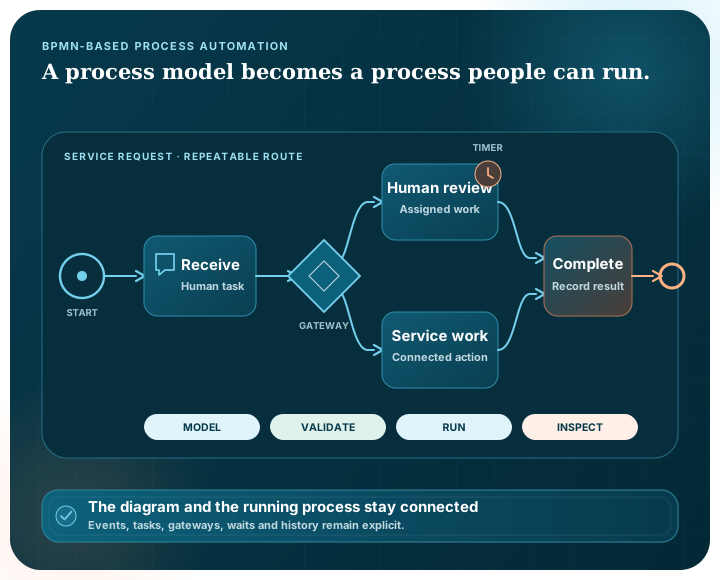
The real model may be larger, but the route remains understandable to the people responsible for it.
Start when a request, message, schedule or supported BPMN event arrives.
Validate the information and apply a decision before work is assigned.
Send independent tasks to the right people or services and wait for the required results.
Use an event or alternate route instead of leaving the exception in an email thread.
Return the outcome and keep the execution record needed to understand the run.
What the process engine handles
Pause for an authorised person to review, approve or complete a task, then continue from their response.
Route work through exclusive, inclusive, parallel, event-based and supported complex gateways.
React to supported start, intermediate, boundary and end events with persisted timer and message state.
Call reusable work, pin a published version where needed and keep child execution connected to its parent.
Transform and validate data, evaluate supported decision logic and carry the result through the process.
Persist runs, waits, events and worker leases so supported work can continue after a service restart.
Working with BPMN files
Pūnaha validates BPMN 2.0.2 XML and retains supported process and diagram information.
An imported process is shown for review before it becomes operational work. External task references, credentials and environment-specific services still need to be mapped to approved Pūnaha resources.
Export keeps the supported model and diagram information in XML. It does not flatten the process into an image that cannot be edited elsewhere.
Check the XML structure and supported definition before publishing the process.
Retain supported shapes, edges and model information through import and export.
Connect external references to the workflows, decisions, models and connections approved for the environment.
Do not make BPMN do every job
| Model | Use it for | Example |
|---|---|---|
| BPMN-based process | A repeatable route with known activities and events | Onboarding, fulfilment or an approval process |
| CMMN-based case | Work that changes as evidence and circumstances change | An investigation, incident or complex complaint |
| DMN-aware decision | A result based on explicit inputs and rules | Eligibility, routing or escalation logic |
BPMN support
Pūnaha provides BPMN-based modelling, supported interchange and durable execution.
The implementation has automated coverage for the BPMN behaviours Pūnaha controls. Imported integrations and external references still need to be tested in the target environment.
We do not claim formal BPMN conformance or certification. A formal claim would require independent review and external-tool interoperability evidence for the specific release and conformance target.
Supported modelling, XML validation, import, export and durable execution.
Automated code and browser-to-database tests for the owned implementation scope.
Formal conformance or complete interoperability with every external BPMN product.
Yes. Pūnaha validates BPMN 2.0.2 XML and supports import and export for the model and diagram information it implements. External references still need environment-specific mapping.
Supported runs, waits, events and worker leases are persisted. Restart-aware automated tests cover the durable execution paths described on this site.
Yes. Retrieval, supported AI models, decisions, documents, integrations and human work can appear as visible steps in the process.
No. The public description is BPMN-based process modelling and execution. No certification or formal conformance claim is made.
We can work through its events, decisions, integrations, human responsibilities and what should happen when something fails.