Briefing pack distributedSource: email record E-02
ConfirmedComplex complaint investigation
Make sense of a complex complaint when the accounts do not agree
Some complaints cannot be resolved by following a single process. The scope changes, evidence conflicts and several people may describe the same event differently. Follow a fictional conduct complaint that is already under investigation, from the active case record to findings, an independent decision and follow-up work.
Interactive investigation
See an active complaint investigation change as the evidence develops
Open the case after intake has finished. Check independence, organise the allegations, compare conflicting accounts, respond to new evidence and keep the final decision separate from the investigation findings.
Fictional walkthroughNo information is submitted or savedAI does not assess credibility or make findings
 Pūnaha
Active investigation
CMP-2026-041
Stage 1 of 10
Stage 01 · Active case
Begin with the investigation that already exists
The complaint has been accepted and intake is complete. Open the prepared case to see its scope, participants and evidence state.
Conduct complaintRestricted case
Decision meeting and subsequent actions
Three allegations · four participants · six evidence items
- Opened
- 12 November 2026
- Current stage
- Investigation
- Decision authority
- Governance panel
Stage 02 · Independence
Make the separation of responsibilities visible
Review declared relationships before assigning the investigator. The fictional example uses prepared roles rather than real people.
Stage 03 · Evidence map
Connect every allegation to what is known and what is missing
The map prevents a large document bundle from becoming a substitute for an investigation plan.
Allegation mapPrepared
A1
Meeting conductMinutes · two statements
1 conflictA2
Information withheldEmail chain · briefing pack
1 gapA3
Action after meetingApproval record · system event
2 sourcesStage 04 · Source-linked chronology
Organise the sequence without turning a draft into a fact
A configured model prepares a chronology from approved material. The investigator checks every event against its source.
Draft chronologyNot prepared
Decision meeting beganSource: meeting record M-01
ConfirmedAdditional information discussedSources disagree on what was shared
ConflictFollow-up action approvedSource: approval record A-04
ConfirmedStage 05 · Investigation plan
Make the necessary work available without fixing the answer
The case plan combines required activities with work the investigator can add when the evidence calls for it.
Case planReady
Review meeting recordsOwner: Investigator
AvailableObtain participant responsesPublished request workflow
AvailableSeek specialist adviceInvestigator may activate
DiscretionaryComplete evidence checkpointBlocks findings until ready
WaitingStage 06 · Conflicting accounts
Place the accounts together without asking AI to choose between them
The investigator sees agreements, contradictions and missing corroboration before deciding what further work is needed.
Account AParticipant statement
“The additional information was described, but the full document was not available during the meeting.”
Agrees: the information was discussed.
Disputed: whether enough detail was available.
Account BParticipant statement
“The group received the complete information before making the decision.”
Agrees: the information was discussed.
Disputed: what the group actually received.
Stage 07 · New evidence
Change the investigation openly when a new allegation appears
A later witness statement describes conduct outside the original scope. The investigator must decide how it should be handled.
Witness statement W-04Received 24 November
Related conduct after the meeting
The witness describes a later instruction that may have affected how the approved action was recorded.
- New participant identified
- Related to allegation A3
- Not covered by the original scope
Stage 08 · Investigation findings
Record a reasoned finding for each allegation
The investigator chooses each finding and records the evidence relied on and any limitation that remains.
Stage 09 · Independent decision
Put the complete investigation before the authorised decision-maker
The decision pack shows the findings, supporting reasons, limitations and proposed organisational actions.
Decision packPanel review
Allegation findingsEach linked to reasons and evidence
Scope changeRecorded with authority and reason
Evidence limitationsVisible to the decision-maker
Proposed actionsSubject to panel approval
Stage 10 · Actions and follow-up
Keep the consequences visible after the decision
The case connects the approved outcome to responsible owners, completion evidence and a later review.
Approved actionsReady to track
Correct the decision recordOwner: Governance support · due 4 December
ReadyClarify meeting information requirementsOwner: Process owner · due 11 December
ReadyComplete independent follow-upOwner: Assurance lead · due 8 January
ScheduledNarrated interaction film
Watch the investigation change when new evidence appears
The film follows the same ten stages and shows the interaction being used. Every organisation, participant, allegation, document, finding and outcome is fictional. Captions and a transcript are provided.
Why the work changes
An investigation needs structure without deciding the answer in advance
A complex complaint can involve several allegations, overlapping events and people with different accounts. New evidence can change the scope after work has started. The investigator still needs to show what was considered, what remained uncertain and why each finding was reached.
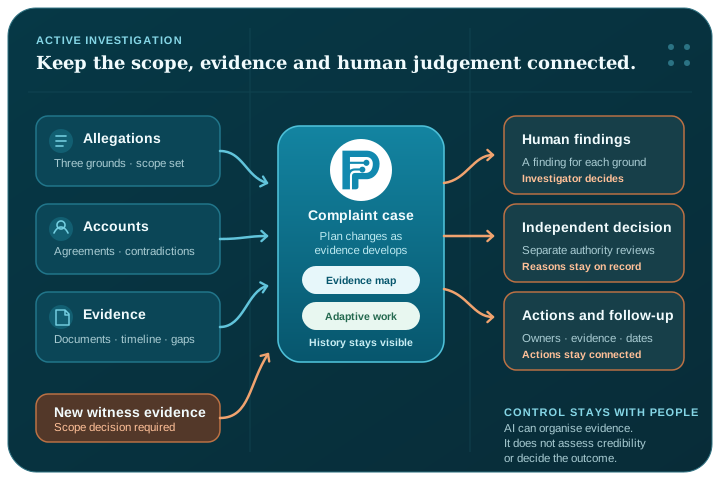
Pūnaha can keep the case plan, evidence, repeatable checks, decisions and history connected. It does not assess credibility, decide whether an allegation is substantiated or choose a consequence. Those judgements remain with authorised people.
A preserved scope
Keep the original allegations and record why the investigation changes.
Evidence in context
Connect each allegation to supporting, conflicting and missing information.
Separate responsibility
Keep investigation findings and the final organisational decision visibly distinct.
One investigation, several kinds of work
Give each part of the investigation the structure it needs
The walkthrough combines an adaptive case with repeatable work, explicit routing rules, approved knowledge and bounded AI assistance.
The case holds the changing investigation
A CMMN-based case keeps the allegations, evidence, people, available work, milestones and history together as the scope develops.
Explore adaptive case managementWorkflows coordinate repeatable checks
BPMN-based workflows can coordinate document requests, interviews, review checkpoints and approved communications.
Explore BPMN workflow automationRules explain the review route
A configurable DMN-based decision can show why an independent reviewer or additional approval is required without deciding the complaint outcome.
Explore DMN decision managementAI helps organise, not judge
A configured model can prepare a source-linked chronology or draft summary. The investigator checks the result and makes every finding.
Explore AI orchestrationA complete investigation lifecycle
The difficult part begins after the complaint has been accepted
The walkthrough opens with an active fictional case containing three conduct allegations, several participants, two policy versions and incomplete evidence. The investigator checks independence, connects the allegations to the available material and creates an investigation plan.
The case then brings conflicting accounts together. A later witness statement introduces a related allegation. The investigator decides to extend the scope, and Pūnaha makes the additional work available while preserving the original case history. Findings are recorded separately for each allegation before an independent decision-maker considers the outcome and follow-up actions.
For the underlying modelling pattern, read the BPMN, CMMN and DMN guide. The guide explains why a changing case, repeatable checks and explicit rules have different jobs.
People remain responsible
The product can organise the record. It cannot make the professional judgement.
The example uses prepared evidence and configurable rules. A real organisation would define its own investigation authority, confidentiality requirements, evidence standards, review route and decision responsibilities.
The public interaction does not submit information, contact participants, assess credibility, make a disciplinary recommendation or send an outcome. It demonstrates how configured product capabilities can support accountable work.
Investigator
Chooses the necessary work, checks the evidence and records findings.
Decision-maker
Reviews the findings and makes the authorised organisational decision.
Pūnaha
Keeps the scope, work, evidence, rules and history connected and inspectable.
Build the real version
Configure the investigation around your organisation's responsibilities
The case solution guide explains how to define roles, stages, requirements, case information and adaptive work. The workflow guide covers repeatable activities and human approvals.
Use the workflow protection guide before applying a model or connection to sensitive work. Test access, evidence handling, timers, failure paths and human decision points with safe information in the environment where Pūnaha will run.
Questions people ask
Complex complaint investigation questions
What makes a complaint investigation complex?
A complaint becomes complex when it involves several allegations or participants, conflicting accounts, incomplete evidence, changing scope or separate investigation and decision responsibilities. The work cannot be understood from one linear checklist alone.
How does adaptive case management support an investigation?
The case keeps the allegations, evidence, work and history together while allowing authorised people to add or change the work when new information makes that necessary. The reason for a scope or plan change can remain part of the record.
Can AI decide whether an allegation is substantiated?
No. In this scenario, a configured model can help prepare a chronology or summary with visible sources. The investigator checks that work and an authorised person records each finding.
How are conflicting accounts handled?
Pūnaha can place the accounts and their supporting material in the same case context. It does not decide which person is credible. The investigator decides what further work is needed and records the reasons for the finding.
What happens when new evidence changes the scope?
The investigator can record the new evidence and choose the appropriate case work. The original scope, completed activities and reason for the later change remain visible instead of being silently rewritten.
Does this replace an organisation's investigation policy?
No. The scenario is a configurable product example. Each organisation remains responsible for its policy, authority, confidentiality, employment, legal and professional requirements.
Is this a real complaint or customer case study?
No. The organisation, participants, allegations, evidence, findings and outcomes are fictional. The interactive example runs in the browser and does not submit or save visitor information.
Your next step
Want to see an investigation pattern shaped around your work?
Bring a safe outline to a private demonstration. Please do not include confidential complaint, employment or personal information in the website booking notes.