Update disposal procedureOwner: Records operations · due 25 November
ReadyPolicy change implementation workflow
Turn an approved policy into work people can complete and explain
Approval is not the finish line. Teams still need to understand what changes, coordinate the work, handle exceptions and show that the organisation is ready. Continue the fictional policy case from the Product Tour through implementation and the effective date.
Interactive walkthrough
Take an approved policy from handover to its effective date
Continue the fictional case from the Product Tour. Change the impact, open an exception, complete the evidence and make the readiness decision. Nothing is sent or saved.
Prepared Pūnaha walkthroughFictional policy and organisationNo customer or compliance result is implied
 Pūnaha
Policy implementation case
POL-2026-024
Stage 1 of 9
Stage 01 · Approved handover
Begin with the approved source and decision, not a new summary
The implementation case receives the policy identity, cited context, effective date, approval and objective from the Product Tour.
Approved sourceReady for implementation
Data retention policy 2026
Approved policy · 24 pages · effective 1 December 2026
- Knowledge source
- Policy library
- Approval
- Legal review completed
- Case
- POL-2026-024
Stage 02 · Impact map
Turn a broad change into affected areas people can own
Select the areas that need implementation work. The public example uses prepared fictional information.
Stage 03 · Repeatable assessment
Give each affected area the same clear route
A mapped BPMN-based workflow gathers the owner, current state, planned action, evidence and readiness date.
Team impact assessment v2Ready
- 1Assign ownerHuman task
- 2Gather current stateStructured response
- 3Plan required changeEvidence requirement
- 4Return resultCase update
Stage 04 · Visible rollout decision
Show why this implementation needs an exception route
Change an input and inspect the matched example rule. This is configurable scenario logic, not a universal policy method.
Stage 05 · Implementation work
Coordinate the agreed work without losing its owner or evidence
The case starts the implementation workflow and keeps each task connected to the approved change.
Implementation planPrepared
Publish case-handling guidanceOwner: Customer service · due 27 November
ReadyChange archive retention settingOwner: Technology · due 29 November
BlockedStage 06 · Adaptive exception
Make additional work available when the evidence calls for it
The legacy archive cannot meet the original date. The case can add exception review without sending every team down that route.
New case evidence19 November · 14:10
Assessment returnedLegacy archive cannot complete the setting change before 1 December.
Existing control confirmedCurrent access and deletion controls remain in place.
Exception reviewAvailable but not started
Stage 07 · Evidence checkpoint
Show what has been completed and what remains conditional
The checkpoint records a prepared snapshot of the implementation state. It does not turn missing evidence into completion.
Readiness evidence3 of 4 ready
Stage 08 · Human readiness decision
Put the implementation state before the person responsible
Pūnaha prepares the review pack and waits. The accountable owner makes the decision.
Readiness packDecision required
Impact registerThree affected areas · six implementation items
Assessment and rollout routeRule R3 · controlled rollout with exception
Evidence checkpointThree complete · one controlled exception
Residual workLegacy archive exception · review 15 January 2027
Stage 09 · Effective date and evidence
Record the milestone without hiding the remaining condition
Move the fictional date forward. The case retains the source, work, exception and human decision in one history.
Policy clock30 November 2026
1dayuntil effective date
The effective-date milestone is waiting.
Narrated interaction film
Watch the policy move from handover to accountable readiness
The film follows the same nine stages and shows the visitor controls being used. The policy, organisation, dates and results are fictional. Captions and a transcript are provided.
Approval begins the implementation work
A policy can be approved while the organisation is still not ready
A policy owner may know the intended outcome and effective date, but the practical effect is spread across teams, processes, systems, guidance and controls. Some work is predictable. Other work appears only when a team finds an exception or new evidence changes the impact.
Pūnaha can keep the approved source, implementation case, repeatable assessments, explicit decisions, human tasks and evidence connected. The responsible people still decide what the policy means for their organisation and whether implementation is ready.
One implementation case
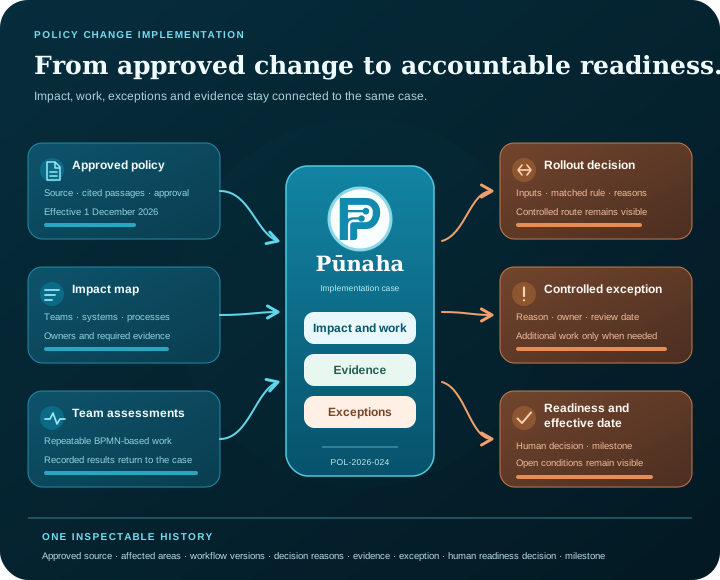
Keep the source, affected areas, work, exceptions and readiness record together.
Repeatable assessment
Give each affected area a consistent route without forcing every exception through the same path.
Accountable readiness
Put evidence and unresolved work before the person responsible for the effective-date decision.
One change, several kinds of work
Use the right structure for assessment, exceptions and decisions
The implementation case does not turn every activity into one long process. It connects adaptive work, repeatable work and visible decision logic around the same approved change.
The case holds the implementation
A CMMN-based case keeps affected areas, evidence, milestones, requirements and available exception work together.
Explore adaptive case managementThe workflow runs consistent assessments
A BPMN-based workflow coordinates the questions, assignments, waits and evidence required from each affected area.
Explore BPMN workflow automationThe decision explains the rollout route
A configurable DMN-based decision uses the recorded inputs and keeps its matched rule and result visible.
Explore DMN decision managementPeople interpret the policy and approve readiness
AI can help organise source-backed context, but it does not decide legal meaning, obligations or readiness on a person's behalf.
Explore AI orchestrationContinue the connected product story
This journey begins where the Product Tour leaves the work
The complete Product Tour follows the fictional Data retention policy 2026 from its approved source through search, an adaptive case, an impact-assessment workflow, an explicit review decision, human approval and creation of implementation work.
This page keeps case POL-2026-024 and continues into the operational detail. It shows how several affected areas can be coordinated, how an exception becomes relevant, how evidence supports a readiness decision and how the effective-date milestone is recorded.
Fit the work around existing systems
Coordinate implementation without pretending to replace every policy or work system
A configured connection can retrieve approved information or pass approved fields to an existing work-management, policy, email or database service. The public walkthrough does not connect to another system, create a real task or send a notification. It shows where a controlled continuation could occur.
For a real implementation, the organisation decides which source is authoritative, who can interpret the change, which actions require approval, which systems may be updated and what evidence must be retained.
Configured connections
Use named HTTP, email or database connections where the target system supports them.
Visible human tasks
Assign implementation and readiness work to the people responsible for it.
Evidence and history
Keep case events, workflow progress, decision reasons, review notes and milestones inspectable.
Build the real version
Start with one policy change and the people who must implement it
The case solution guide explains how to configure adaptive work, roles and case information. The workflow build, publish and run guide covers repeatable team assessments and implementation tasks.
Use the BPMN and DMN guide when modelling the assessment process and rollout decision. Replace every example rule, role, date, source and connection with choices approved for your organisation.
Questions people ask
Policy change implementation questions
What is a policy change implementation workflow?
It is the coordinated work used to understand an approved change, identify affected areas, assign implementation activities, handle exceptions, collect evidence and decide whether the organisation is ready for the effective date.
How do workflow and case management work together?
The case holds the changing implementation, affected areas, evidence and available work. Published workflows coordinate repeatable activities such as team assessments, assignments, waits and evidence checks. Their results return to the same case.
Can Pūnaha track a policy effective date?
A configured workflow or case can use dates, timers, tasks and milestones to coordinate work around an effective date. The organisation decides what the date means, which evidence is required and who can approve readiness.
Does AI decide what a policy legally requires?
No. A configured model can help organise source-backed information, but it does not provide legal or compliance advice and should not replace interpretation by appropriately responsible people.
Can Pūnaha connect to an existing policy or work-management system?
Pūnaha supports configured HTTP, email and database connections. Whether a particular system can be connected depends on its interface, authentication and the controls your organisation requires.
Does Pūnaha replace a policy-management or GRC platform?
This page presents Pūnaha as a configurable knowledge, case, workflow and decision platform. It does not claim to replace every policy-authoring, records-management, governance, risk or compliance system.
Does the public policy walkthrough submit or save information?
No. The scenario uses fictional prepared data and stays in the browser. The controls change only the demonstration on the page. Nothing is submitted, saved or sent to an operational system.
Your next step
Want to explore a change your teams need to implement?
Bring a non-confidential outline to a private demonstration. We can discuss how approved sources, impact assessment, cases, workflows, decisions and readiness evidence could fit together.