
Semantic search
Retrieve content by meaning, which helps when a query and its best source use different language.
Enterprise AI search
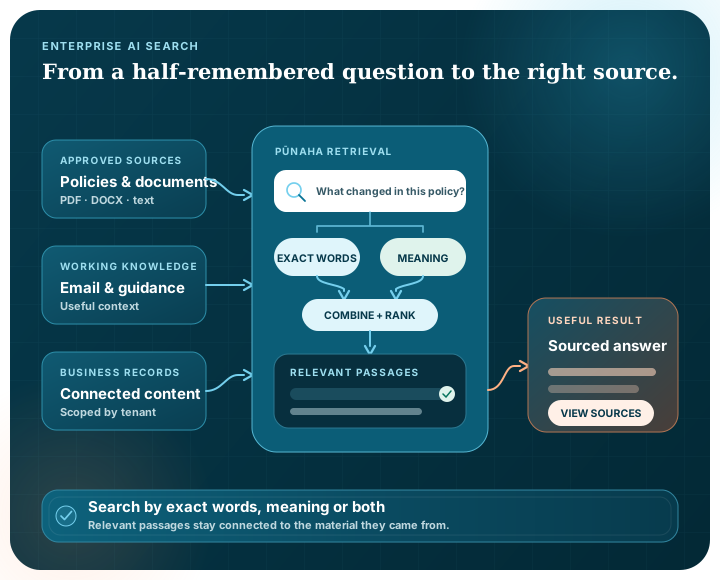
People rarely remember the exact title of a document or the wording inside it. Pūnaha can search by meaning, exact terms or both, helping them reach the material that is useful for the question in front of them.
A better search experience
Useful search has to cope with different wording, exact identifiers and knowledge spread across more than one kind of file.
Retrieve content by meaning, which helps when a query and its best source use different language.
Combine semantic relevance with keyword matching when exact terms, names or identifiers matter.
Extract searchable text from supported office documents, PDF, email, RTF, EPUB and OpenDocument files.
Keep separate knowledge databases for different tenants and operational contexts.
Explore access governancePass relevant retrieved material into a workflow so the selected model works with approved context.
Explore workflowsUse application logs, audit information and workflow execution history to understand what happened.
Behind the result
Ingest text and supported files, including email and Outlook attachments.
Extract and organise the material for the selected tenant-aware knowledge store.
Use semantic or hybrid retrieval according to the query and use case.
Return relevant context, support an AI response or continue through a governed workflow.
After the search
The information may need to support a response, a decision or a longer piece of work.
A retrieval step can sit inside a versioned workflow alongside prompts, model calls, approvals and merged results.
This lets teams reuse the same governed knowledge in different processes without forcing every task into a single assistant experience.
Help a person locate material relevant to a question or investigation.
Provide a model with selected organisational context before it prepares a response.
Use retrieved information as one step in a longer process with review and action.
Questions
Keyword search looks for matching terms. Semantic search looks for related meaning. Pūnaha also supports hybrid retrieval so an implementation can use both signals together.
Yes. Pūnaha works with organisational knowledge and can run on customer-controlled infrastructure. Access design and source permissions still need to be configured for the intended environment.
Text extraction is supported for PDFs that contain readable text. OCR for image-only PDFs is not currently presented as a ready website capability.
Yes. Retrieval is a workflow building block and can provide relevant context to later prompt, model, approval or merge steps.
We can use a private demonstration to look at the source formats, search approach and next step you need to support.