
Enterprise AI planning guide
Before you start an AI pilot, make sure the work is ready
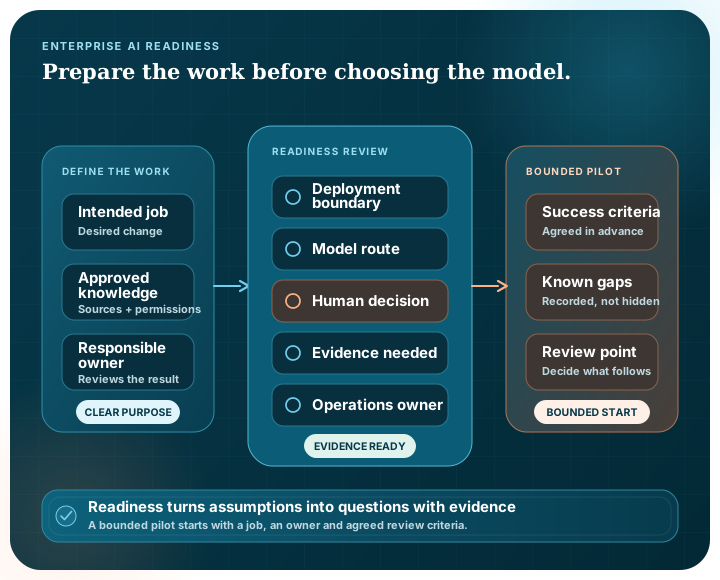
A pilot is easier to judge when everyone agrees on the job, the information it needs and the person responsible for the result. This checklist helps your team prepare those answers before choosing a platform or model.
Printable resource
Take these questions into the room
The two-page PDF gives you space to mark each readiness question and list the evidence your team still needs.
The checklist
Eight questions worth answering before the pilot begins
What decision or task should improve?
Describe a bounded job, its intended result and the person or team that remains responsible for using that result.
Which knowledge is allowed to support it?
Identify representative sources, owners, currency expectations, permissions and the information that must stay outside the evaluation.
Who can use each resource?
Identify the people, groups and services that need each action, who can administer access and how the assignments will be reviewed.
How will quality be judged?
Prepare realistic questions or cases, define acceptance criteria and agree who can judge relevance, accuracy and usefulness.
Where can the system and its data run?
Document infrastructure, networks, identity, data residency, operational ownership and the permitted paths to model providers.
Which model and workflow choices are required?
Decide whether local or external models are suitable for each step, and map the retrieval, validation, branching and integration needs around them.
Where must a person review or approve?
Make consequential decisions visible. Define the conditions for review, the information a reviewer needs and what is recorded when they approve or reject.
How will the solution be operated and changed?
Clarify monitoring, support, retention, incident response, workflow versioning and the boundary between the product team and the surrounding organisation.
Bring evidence, not assumptions
Bring evidence instead of assumptions
| Area | Prepare | Why it matters |
|---|---|---|
| Work | Representative tasks and intended outcomes | Keeps the evaluation tied to a real need |
| Knowledge | Approved examples, source owners and access rules | Tests retrieval quality and the data path |
| Access | Named resources, required actions, owners and review timing | Tests least privilege and makes effective access explainable |
| People | Users, reviewers and accountable owners | Shows where human judgement belongs |
| Technology | Environment and integration constraints | Prevents a polished demonstration from hiding an architecture mismatch |
| Operations | Support, monitoring and change expectations | Makes long-term ownership explicit |
A few common readiness questions
Is a proof of concept enough to show readiness?
A proof can reduce uncertainty, but it should use representative work, clear success criteria and the controls required for the intended environment. A compelling answer alone does not establish operational readiness.
Should we choose a model before defining the workflow?
Start with the task, knowledge and control requirements. Model choice is important, but it is one part of a wider information and workflow design.
What does human approval add?
A meaningful approval point lets a person assess context and suitability before a consequential process continues. Its timing, authority and record should be designed deliberately.
Use the checklist with a real piece of work
Bring one representative task, the knowledge it depends on and the deployment questions your team still needs to resolve.