Operational incident response workflow
Coordinate an operational incident without losing the evidence or decisions
An incident rarely follows the first plan. New evidence arrives, priorities change and people still need a reliable way to coordinate the response. Follow a fictional service incident from the first report through triage, a governed severity decision, recovery and the post-incident review.
Interactive walkthrough
Follow an operational incident from report to review
Change the fictional impact, inspect the response-level decision, add new evidence and move the incident through recovery. Nothing is sent or saved.
Prepared Pūnaha walkthroughFictional service and dataNo customer result is implied
 Pūnaha
Operational incident response
INC-2027-042
Stage 1 of 9
Stage 01 · Incident report
Open one case for the situation as it is understood now
A service owner records the first facts. Try changing the affected-user estimate. The same incident record follows the response.
Stage 02 · Structured triage
Gather approved context before asking the team to choose a route
The case starts a published triage workflow. It retrieves approved material and prepares a source-aware incident summary.
Published workflowOperational incident triage
- 1Read service statusNamed HTTP connectionReady
- 2Retrieve approved runbookKnowledge source and resolved incidents3 sources
- 3Prepare incident summaryConfigured model with sources visibleWaiting
- 4Human triage reviewConfirm the incident pictureQueued
Stage 03 · Configurable response-level decision
Show the inputs, the rule and the reason for the result
Change the example answers. The response level updates visibly. This is not a universal incident model.
Stage 04 · Adaptive response plan
Make the right work available for what is known now
The case plan combines required work, milestones and discretionary tasks. Activate the response plan to see the current route.
Incident case planWork available now
Stage 05 · Repeatable response
Coordinate the agreed activities while the case holds the situation
A mapped BPMN-based workflow handles repeatable containment, communication, human approval and waiting.
Mapped process taskMajor incident response v3
Workflow runReady to startRun will remain linked to INC-2027-042
Stage 06 · New evidence
Let the response change without losing what happened earlier
A new dependency signal arrives. Add it to the case and watch the specialist review become relevant.
Case evidenceWhat the team knows
- Incident reportedIntermittent sign-in failures
- Runbook and history retrievedThree approved sources
- Major response selectedRule R3 with reasons retained
- Identity dependency latency signalPrepared fictional monitoring evidence
Stage 07 · Human decision
Prepare the choice, then leave the consequential decision with a person
The incident lead reviews the evidence, containment options and prepared stakeholder update. Choose the route to record.
Decision packContainment and communication
Evidence 4 itemsDecision R3People 3 assigned
Stage 08 · Recovery monitoring
Wait for evidence of stability before declaring recovery
The response workflow is waiting for a correlated recovery signal. Simulate the signal after the fictional monitoring window.
Recovery monitoring30-minute stability window
Successful sign-ins91.8%
Dependency latency780 ms
…
Waiting for recovery signalThe workflow can resume when the named event is received.
Stage 09 · Post-incident review
Begin the review with the evidence and decisions already assembled
Move the scenario forward 48 hours to make the review task active.
Recovery48 hoursReview active
The timer changes only this prepared walkthrough.Review Koru Access incident INC-2027-042
- Assigned to
- Service improvement lead
- Evidence pack
- Report, sources, case events and monitoring
- Decision history
- Response rule and human containment approval
- Follow-up
- Runbook, problem analysis and owner actions
The task will become active at the configured 48-hour point.
- Incident case opened
- Response decision recorded
- Recovery milestone reached
Watch the whole response
See how the incident changes and how the response changes with it
The narrated film follows the same fictional journey and shows the interaction at each stage. It loads only when you choose to play it.
Why the response has to adapt
The response needs structure without pretending the situation is predictable
An operational incident starts with incomplete information. The team may know which service is affected but not why. A workaround that looks sensible at first can become unsafe when a dependency or wider business impact comes to light.
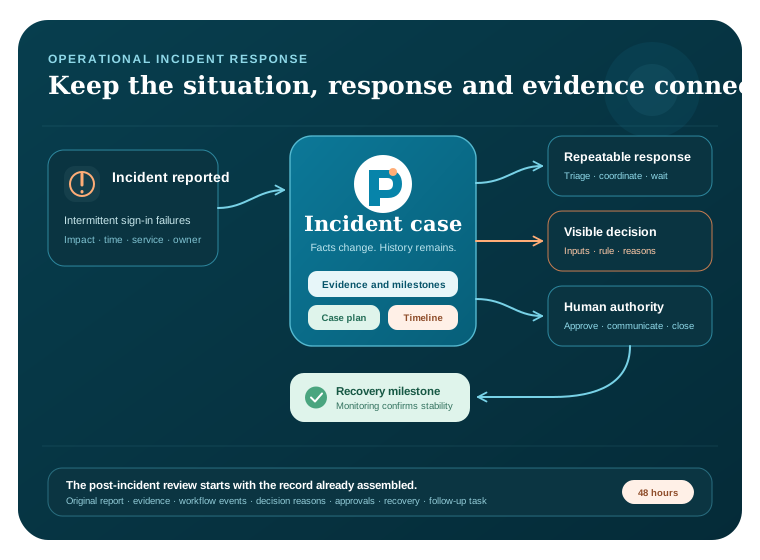
Pūnaha can keep the incident, evidence, work and decisions together. A case holds the changing situation. Published workflows coordinate repeatable activities. Explicit decisions show why a response path was selected. People remain responsible for containment, communication, recovery and closure.
One incident record
Keep the report, evidence, work, decisions and review history connected.
Work that can change
Enable specialist or discretionary work when new evidence makes it relevant.
Visible reasons
Show the inputs and matched rule behind the configured response level.
One response, three kinds of structure
Use a case, process and decision for the jobs they do best
The example is deliberately more than a process diagram. It shows how adaptive work and repeatable work can cooperate without hiding the decision that connects them.
The case holds the changing incident
A CMMN-based case keeps the facts, evidence, milestones and available work together as the response develops.
Explore adaptive case managementThe process coordinates repeatable work
A BPMN-based workflow handles the agreed triage, communication, approval, waiting and recovery steps.
Explore BPMN workflow automationThe decision explains the response level
A configurable DMN-based decision evaluates the supplied inputs and keeps the matched rule and reasons visible.
Explore DMN decision managementAI supports the team, not the other way around
A configured model can prepare a source-aware summary from approved information. People still choose the response and approve consequential action.
Explore AI orchestrationA complete incident lifecycle
Triage is only the beginning
The walkthrough begins when a service owner reports intermittent sign-in failures affecting a fictional internal business service. The incident case starts a published triage workflow, applies a configurable severity decision and activates the work appropriate to the information available at that moment.
When new evidence points to an external identity dependency, the case makes specialist review available without discarding the earlier evidence. A human incident lead approves the containment route and the prepared communication. Recovery is monitored through a durable wait, then a timed post-incident review brings the evidence and decisions back into view while they are still useful.
For a shorter view of the repeatable triage path, open the operational incident triage walkthrough. This page continues beyond triage to show how the wider incident case changes over time.
Work with the environment you already have
Pūnaha can coordinate the response without pretending to replace every operational tool
A configured connection can retrieve approved context or pass approved fields to an existing incident service, email route or database. The public walkthrough does not connect to another system, send a notification or make a change. It shows where that controlled continuation could occur.
For a real implementation, your organisation decides which systems can be read, which actions require approval, which people can see the case and which evidence must be retained. Those choices should be tested in the environment where Pūnaha will run.
Configured connections
Use named HTTP, email or database connections where they fit the response.
Human checkpoints
Put approval before containment, communication or another consequential action.
Inspectable history
Keep case events, workflow progress, decision reasons and human choices visible.
Build the real version
Start with an incident your teams already understand
The case solution guide explains how to configure adaptive work, roles and case information. The workflow build, publish and run guide covers the repeatable response activities that a case can start.
Use the BPMN and DMN guide when modelling the response process and severity decision. Replace every example rule, role, threshold and connection with choices approved for your organisation.
Questions people ask
Operational incident response questions
What is an operational incident response workflow?
It is the coordinated work used to understand, contain, communicate, recover from and review an operational service incident. A useful workflow gives repeatable activities a clear route while allowing the response to change when new evidence arrives.
How does adaptive case management help during an incident?
The case keeps the incident facts, evidence, milestones, people and available work together. Conditions and events can make new tasks relevant as the situation changes, without forcing every incident through an identical sequence.
What work is handled by BPMN, CMMN and DMN?
In this example, the CMMN-based case holds the changing incident, BPMN-based workflows coordinate repeatable response activities and a DMN-based decision explains the configured response level. The standards have different jobs but share the same incident context.
Can Pūnaha connect to an existing incident management platform?
Pūnaha supports configured HTTP, email and database connections. Whether a particular incident platform can be connected depends on its available interface, authentication and the controls your organisation requires. The public example does not call an external platform.
Does AI decide incident severity or take action automatically?
Not in this walkthrough. A configured AI model prepares a source-aware summary. The response level comes from visible example decision rules, and a person approves the containment route and communication before any configured continuation.
Is Pūnaha a cybersecurity incident response product?
This page is about operational service incidents. Pūnaha provides configurable cases, workflows, decisions, knowledge and connections that an organisation can shape around its work. It is not presented here as a specialist cybersecurity response product or a source of security advice.
Does the public incident walkthrough send information anywhere?
No. The scenario uses fictional prepared data and stays in the browser. The controls change only the demonstration on the page. Nothing is submitted, saved or sent to an operational system.
Your next step
Want to explore an incident your teams recognise?
Bring a non-confidential outline to a private demonstration. We can discuss where the case, repeatable response, decision rules, knowledge and human approvals would fit.