
AI and knowledge
Configure prompts, semantic or hybrid retrieval, local or external model calls and durable knowledge writes.
AI workflow and process orchestration
Most useful automation is not one prompt. It starts somewhere, gathers information, makes choices and sometimes waits for a person. Pūnaha lets you lay out that work as a visual workflow, so people can see what happens and change it without losing the history.
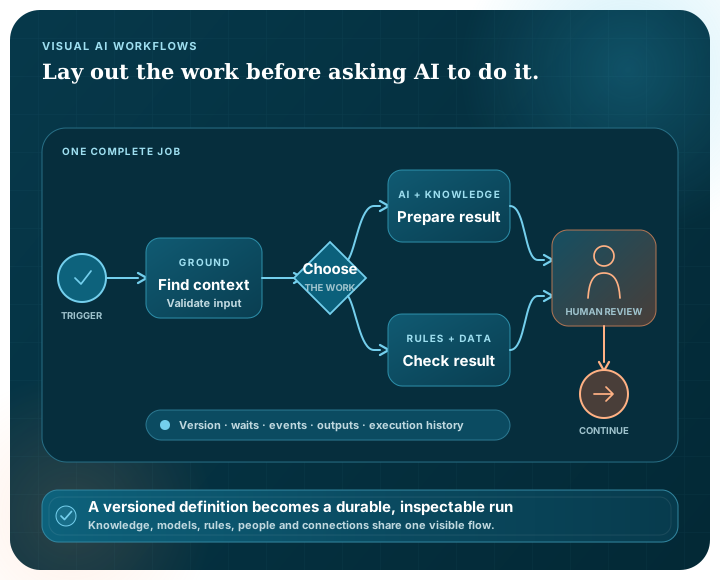
A flexible sequence
A workflow might begin with a question, a file, a schedule or an event in another system. From there it can take a short route, split into parallel work or join a wider BPMN-based process.
Start from input, a webhook, a schedule or a supported process event.
Retrieve approved knowledge, validate data and prepare the task.
Use models, rules, documents, connections or a reusable child workflow.
Pause for approval or an assigned human task when judgement is required.
Publish a message, update knowledge, return an output or move to the next process stage.
Visual workflow modules
The visual builder brings the supported modules into one place. A developer can connect knowledge, decisions, documents, integrations and AI without hand-editing the core workflow definition.
Configure prompts, semantic or hybrid retrieval, local or external model calls and durable knowledge writes.
Transform and validate data, evaluate conditions and decision tables, merge branches and record approval outcomes.
Assign human tasks, set due and overdue behaviour, pause for approval and add digest-backed evidence checkpoints.
Extract or split text, apply configured redaction and classification rules, render templates and create standard file outputs.
Use approved HTTP, email and database connections, plus a durable local message queue for publish, receive, retry and dead-letter handling.
Explore connectionsUse persistent waits, correlated events, bounded batch processing, parallel paths and pinned or latest child-workflow versions.
Operational execution
Start a published workflow once, at an interval or from a cron schedule with an explicit time zone and bounded catch-up window.
Begin or resume work from approved external requests and correlated events.
Hand work to competing consumers, lease a message and acknowledge, retry or dead-letter it explicitly.
Retain timers, approvals, tasks and events without relying on a continuously open browser.
Persist workflow versions, runs, waits, events, outputs and worker leases in the Pūnaha platform.
Review the current state and append-only execution events when diagnosing or governing a run.
Controlled change
Arrange the triggers, data, knowledge, models, rules, integrations and people required for the intended work.
Check the workflow structure, module configuration and referenced resources before publication.
Publish an immutable version rather than changing a live process without a clear boundary.
Run the workflow durably and review events, waits, human work, outputs and failure state.
Structured process automation
For structured processes, Pūnaha supports BPMN-based activities, events, gateways, subprocesses, transactions, data and diagram interchange.
Use the provider-neutral workflow modules for product capabilities and the BPMN-based process model for the standard process elements that coordinate them.
Pūnaha does not currently make a formal BPMN conformance claim. Independent review and external interoperability evidence remain separate release requirements.
Model repeatable work with explicit events, activities, gateways and responsibilities.
Explore BPMN automationKeep repeatable rules explicit through conditions and decision tables.
Use CMMN-based adaptive case management when the next appropriate task depends on evidence and judgement.
Explore adaptive casesPūnaha coordinates model calls, retrieval, decisions, tools and human work inside a defined workflow. It can support agent-like processes, but we use precise workflow language rather than suggest unchecked autonomous behaviour.
Yes. Workflows can use configured local models and supported external model providers. Approved HTTP connections can also connect services that expose suitable APIs.
The visual builder covers triggers, prompts, retrieval, models, data transformation and validation, conditions, decision tables, approvals, human tasks, documents, HTTP, email, databases, message queues, waits, events, batches, child workflows, evidence checkpoints, merges and outputs, together with supported BPMN elements.
Yes. Supported waits, approvals, human tasks, events and run state are persisted by the Pūnaha platform and can resume independently of the original browser session.
Yes. Definitions are validated and published as immutable versions, with durable execution records and support for pinned or latest child-workflow versions.
We can use a private demonstration to map where it starts, what information it needs, who makes the decisions and what should happen when something goes wrong.