
Knowledge stores
Create tenant-aware vector databases, ingest supported documents and choose semantic or hybrid retrieval for the query pattern.
For developers and configurators
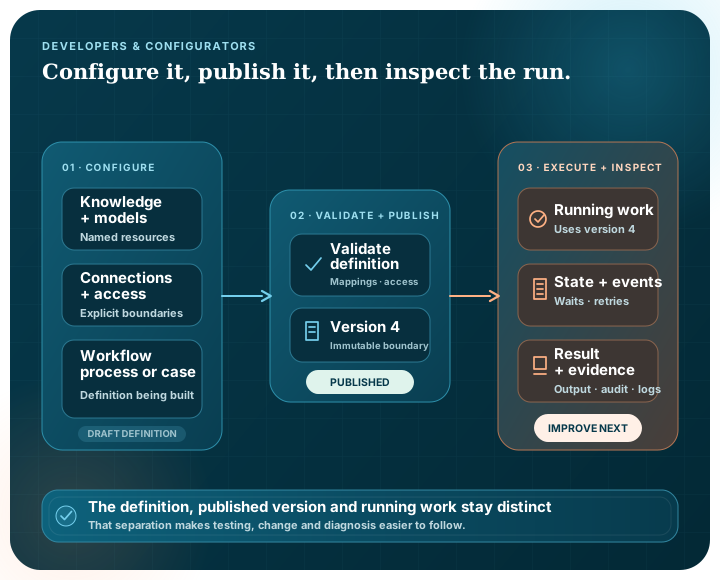
Pūnaha gives you visible building blocks for knowledge, models, connections, access, workflows, BPMN-based processes and CMMN-based cases. You can validate a definition, publish a controlled version and inspect the running work through the browser or API.
Building blocks
Create tenant-aware vector databases, ingest supported documents and choose semantic or hybrid retrieval for the query pattern.
Manage local GGUF models and supported external providers separately from the workflows that refer to them.
Configure triggers, AI, knowledge, logic, people, documents, connections, messages, waits, batches and reusable workflows in the visual builder.
Model, validate, import, export and execute supported BPMN activities, events, gateways, data and subprocesses.
Design case files, stages, plan items, sentries, planning tables, lifecycle and CMMNDI layout for adaptive work.
Assign exact actions for named resources to people, groups and services, then inspect the effective decision.
Explore access governanceInspect workflow and case state, append-only events, approvals, human work, audit history and operational logs.
Workflow module palette
Transform values, validate a supported JSON Schema subset, route conditions and evaluate FIRST, UNIQUE or COLLECT decision tables.
Configure approvals and assigned or role-based human tasks with priority, due time, overdue behaviour and completion shape.
Extract and split text, redact configured patterns, classify from explicit categories, render templates and create portable file outputs.
Queue text into the existing ingestion pipeline with the target database, file metadata and replacement strategy.
Publish and receive local queue messages, then acknowledge, retry with delay or move them to a dead-letter state.
Use one-time, interval or time-zone-aware cron triggers and record digest-backed evidence checkpoints at important boundaries.
Interfaces and resources
| Surface | Purpose | Boundary |
|---|---|---|
| Browser application | Configure, publish, run and inspect product resources | Permissions and active licence determine what is visible and allowed |
| OpenAPI 3.1 | Inspect and call the routes enabled for the running service set | The document is generated from the services actually enabled |
| Connections | Configure HTTP, email, Microsoft 365, supported databases and model endpoints | Credentials are encrypted; provider and live-environment validation remain explicit |
| BPMN and CMMN files | Exchange supported process and case definitions with diagram information | External references require mapping; no formal conformance claim is made |
| Audit and execution events | Understand changes, permission denials and run behaviour | Sensitive inspected content is not copied into protection-event metadata |
Access and service boundaries
A working route is only useful when the right person or service can call it for the right reason.
Authorise an exact action against a named workflow, case, knowledge store, model, connection or other governed resource.
Use individual users, local or mapped external groups, and explicit service identities.
Inspect the roles, group membership, grants, denials and time boundaries that produced effective access.
The generated OpenAPI document reflects the service groups enabled for the running process rather than advertising routes that are not active.
Separated workflow and AI services use an explicit private contract and service access instead of treating internal traffic as automatically trusted.
Keep provider settings in named resources, then validate the intended target with the customer's network and account.
Explore connectionsConceptual configuration
This small example shows how named resources relate to a workflow. It explains the shape of the configuration; it is not a copy-and-paste API contract.
A published workflow can refer to knowledge, model and connection resources while preserving its own purpose and version. That separation supports deliberate operational change without rewriting every process.
workflow: policy-review
version: 4
trigger: weekday-schedule
steps:
  - retrieve: policy-knowledge
  - validate: required-evidence
  - decide: review-routing
  - human-task: subject-matter-review
  - evidence-checkpoint: approved-decision
Delivery lifecycle
Set up the knowledge, models, connections, roles and storage destinations required by the design.
Build the workflow, process or case and resolve structural, mapping and permission issues.
Create a clear operational boundary that running work can remain pinned to.
Test waits, retries, unavailable services, rejected human work and restart behaviour before wider use.
Use execution events, audit history and operational logs to understand behaviour before publishing another version.
No. The Pūnaha public website uses generated HTML, CSS and small amounts of framework-free JavaScript. The local website editor is separate and is not deployed.
Yes. The Pūnaha executable serves an OpenAPI 3.1 document and embedded Swagger UI. The documented routes reflect the service groups enabled for that running process.
Yes. Workflow steps refer to configured model deployments, which separates workflow intent from the local or external provider connection.
Yes. The effective-access view explains whether the requested action is allowed and which roles, groups, grants, denials and timing rules contributed.
No certification or formal conformance claim is made. Pūnaha provides BPMN-based and CMMN-based modelling, validation and supported interchange, while independent review and external-tool evidence remain separate release requirements.
We can walk through its resources, modules, standards and execution path, including the places where you expect it to fail.