
Keep sensitive work where it belongs
Run Pūnaha on customer-controlled infrastructure with explicit model, storage and service placement choices.
Knowledge, AI and work in one place
Your organisation already has knowledge, systems and people who know how the work should be done. Pūnaha helps you connect them. Find the right information, use the AI that suits the job, and move the work forward without taking judgement away from the people responsible for it.
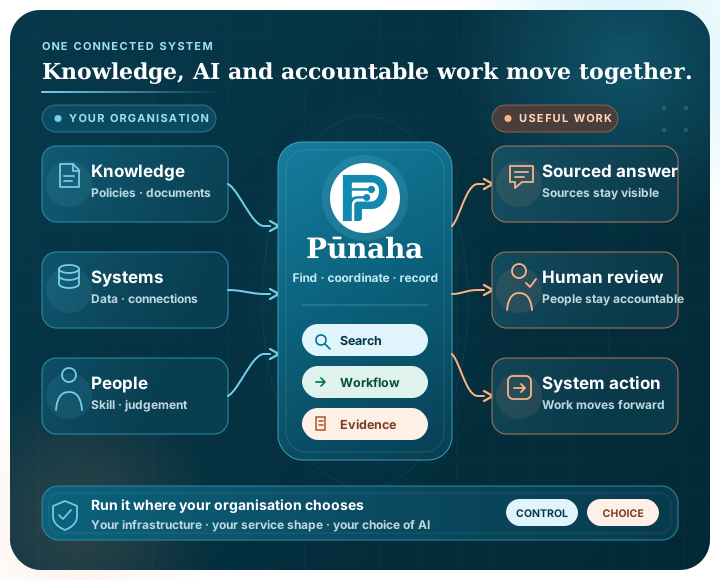
Start with your needs
You can decide where Pūnaha runs, which models it uses and where a person needs to stay involved.
Run Pūnaha on customer-controlled infrastructure with explicit model, storage and service placement choices.
Run supported local models or connect external providers. One workflow does not have to depend on one model.
Connect knowledge, prompts, models, decisions, documents, integrations and people in a workflow you can see.
Use an adaptive case when the next step depends on new evidence or professional judgement.
Pause for review or approval when context and accountability matter more than speed.
Control that follows the work
Pūnaha gives your team practical control over where the system runs, who can use each resource and how work moves between knowledge, AI and people.
You can begin with everything together, or separate parts of the platform when your architecture calls for it. You can also connect the systems and models you already use instead of rebuilding the process around one provider.
Access can be set for a named workflow, case, knowledge store, model or connection. When someone needs to understand a decision, Pūnaha can show why the access was allowed or denied.
Use an all-in-one or separated service shape on customer-controlled infrastructure to suit the implementation.
Review deployment choicesGive people, groups and services the access they need to named resources, then review that access with clear evidence.
Explore access governanceUse approved connections for business systems, databases, email, local models and external AI.
Explore connectionsFrom knowledge to useful work
Finding the right source matters. What happens next matters just as much.
People do not always remember a document title or the exact language used in a policy. Pūnaha can search supported documents, email and connected sources by meaning, exact terms or both.
That source material can then support a person directly or become part of a workflow with visible steps, review points and a record of what happened.
Search trusted organisational knowledge using meaning, keywords or a combination of both.
Explore enterprise AI searchChoose a supported local or external model for each task and environment.
Explore deployment choicesTurn useful answers into repeatable workflows with human approval when needed.
Explore AI workflowsCoordinate case work where people can plan the next appropriate task as new information arrives.
Explore adaptive casesDifferent work needs different structure
Pūnaha does not force a process, a decision and a case into the same kind of diagram.
Model and run structured processes with events, tasks, gateways, waits, subprocesses and durable execution.
Explore BPMN automationExpress repeatable business decisions as explicit inputs, ordered rules and inspectable outputs.
Manage evolving work with case files, stages, tasks, milestones, sentries and discretionary planning.
Explore adaptive case managementChoose the right model for a repeatable process, an adaptive case or an explicit decision rule.
Read the modelling guideA simple example
The answer may be simple, or it may need a model, a person and another system. You can see each step.
Start with a question, request or event.
Bring in relevant material from an approved knowledge store.
Send the task to the local or external model selected for that step.
Pause for a person when policy or judgement requires it.
Return an answer or pass the approved result to the next step.
Choose your view
A board member, a technology leader and a developer need different details. Each view leads into the same product.
Understand the strategic choices around knowledge, AI, deployment and control.
Read the leadership viewAssess deployment fit, governance, models and the path to practical adoption.
Review technical fitSee how knowledge stores, model deployments, workflows, processes and cases come together.
Explore the developer viewProduct tours
These are product examples rather than customer stories, so you can focus on how the system works.
Find reliable answers across policies, documents and shared knowledge.
Take the tourGather evidence, use AI assistance and keep a person at the decision point.
Take the tourUse different models for different parts of the same process.
Take the tourRetrieve approved guidance and prepare a response for review.
Take the tourSee whether it fits
We will shape a private demonstration around the knowledge, process or environment you want to understand.