
Customer-managed
Deploy Pūnaha in an environment controlled by the customer, with the surrounding infrastructure and operations agreed for that implementation.
Private AI deployment
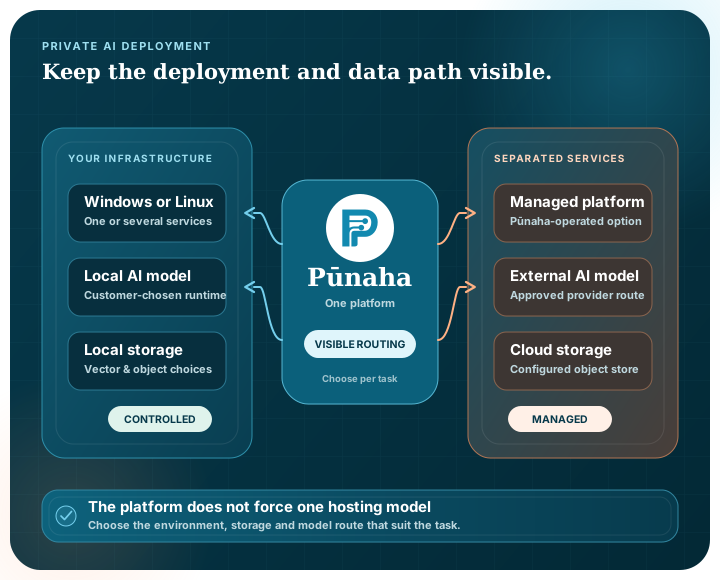
You may need the platform in your own environment. You may prefer a managed cloud service. You may want a local model for one task and an external model for another. Pūnaha keeps those choices open and visible.
Where it runs
Choose an operating model that fits your environment instead of moving every requirement to fit a cloud-only product.
Deploy Pūnaha in an environment controlled by the customer, with the surrounding infrastructure and operations agreed for that implementation.
Place service pools on customer-controlled infrastructure when scale or isolation requires it.
The Pūnaha application supports Windows and Linux environments, subject to the implementation architecture.
Run all enabled services together or use the same executable for separate control, workflow, AI and browser-facing service pools. MySQL remains separately operated.
Deployment shape
| Area | Available shape | What to agree for the implementation |
|---|---|---|
| Application services | All enabled services in one process, or separate control, workflow, AI and browser-facing pools | Service placement, capacity, network paths and operational ownership |
| Data | Three logical MySQL databases for control, workflow and AI concerns | Durability, backup, recovery, credentials and lifecycle management |
| External entry | A same-origin gateway can provide one browser-facing route across separated services | TLS, routing, trust boundaries and failure behaviour |
| Replicas | Durable coordination leases support more than one eligible service instance | Shared storage, identity, admission, readiness and environment acceptance |
| Health checks | Separate liveness and readiness signals | Which dependencies must be ready before an instance receives work |
What stays where
Installing software in your environment is only one part of private operation.
Pūnaha can test compatible local acceleration and retain separate recommendations for embedding and language-model workloads.
Administrators can keep automatic runtime selection or choose an explicit processor and scheduling policy for the server.
Keep tenant vector indexes under the customer-managed local data directory.
Select Amazon S3 or a compatible destination for supported vector-index and structured-log purposes.
Select an Azure Blob destination for supported vector-index and structured-log purposes.
Changing a vector destination does not copy an existing index. Migrate or re-ingest the retained content before switching.
Choose by task
Models are configured separately from workflows, so you can choose a suitable deployment for each job and change it without redesigning the whole process.
Run supported GGUF models locally through llama.cpp for tasks intended to stay within the local environment.
Connect OpenAI or a supported OpenAI-compatible endpoint when that service fits the use case.
Configure Azure OpenAI deployments as an external model option.
Use supported Anthropic models for selected workflow steps.
Connect supported Gemini models where their capabilities and service terms fit.
Refer to configured model deployments from workflows rather than embedding one provider into every process.
Explore connectionsBe clear about the boundary
Where the software runs matters, but it does not answer every privacy, security or operational question.
Source permissions, network paths, model endpoints, operational access and retention choices all shape the resulting control boundary.
Pūnaha provides deployment, model, storage and service-topology options. Each implementation still needs an agreed architecture and security review that reflects the organisation's requirements.
Understand which sources, services and models can receive content at each step.
Decide who runs, monitors and changes the deployment.
Add approval where automated continuation is not appropriate.
Control which people, groups and services can use each governed resource.
Explore access governancePūnaha runs on customer-controlled infrastructure. The all-in-one or separated service shape depends on the customer's environment and operating requirements.
Yes. Pūnaha supports local GGUF model execution through llama.cpp as well as supported external model providers.
Yes. Different workflow steps can refer to different configured model deployments when the process calls for it.
No. The same executable can run all enabled services together or run selected control, workflow, AI and browser-facing services in separate pools. The intended topology still needs environment-specific acceptance testing.
No broad air-gap claim is made on this site. A customer-managed implementation can use local models, but the complete architecture must be reviewed for the specific environment.
We can walk through the deployment, model, storage and workflow choices with your constraints in view.