
Named resources
Let a workflow refer to an approved connection rather than repeating endpoints and credentials in every process.
Connections
Enterprise AI connections should make system boundaries clearer, not bury them inside a workflow. Pūnaha provides named resources for business systems, databases, email and AI so a workflow can refer to an approved connection instead of carrying credentials and provider details through every step.
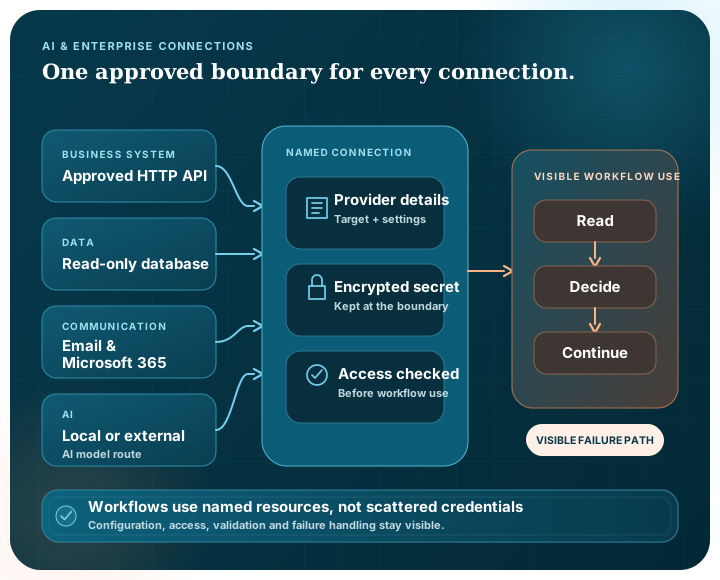
Connection options
| Connection | Current capability | What to validate in your environment |
|---|---|---|
| HTTP services | Named HTTP connections for workflow calls, with deterministic product coverage | Allowed destinations, TLS, authentication, request limits and response handling |
| SMTP connections and workflow email actions, with deterministic and online test coverage | Sender policy, delivery, security controls and operational ownership | |
| Microsoft 365 | Configurable Microsoft 365 connection settings | Tenant consent, Microsoft Graph permissions and live behaviour in the chosen tenant |
| Databases | Connection settings for SQL Server, PostgreSQL and MySQL | Network path, TLS, database permissions, query safety and live target behaviour |
| Local AI | Local GGUF model execution through llama.cpp | Model provenance, licensing, hardware fit and content policy |
| External AI | Supported provider configurations referenced by model deployment resources | Provider credentials, terms, data movement, model suitability and live service behaviour |
| Messages and webhooks | Workflow modules for durable messages and external event-driven calls | Delivery guarantees, retries, authentication and the receiving system's behaviour |
Connection controls
Let a workflow refer to an approved connection rather than repeating endpoints and credentials in every process.
Store configured connection secrets encrypted at rest and do not return them through the settings API.
Control who or which service can use a connection, separately from the workflow that refers to it.
Explore access governanceTest the actual provider, account, network and permissions before treating a configured connection as production-ready.
Place a connection call in the workflow so people can see where information leaves the process and what happens next.
Plan what the workflow should do when a target is slow, unavailable or returns an unsuitable result.
A practical connection path
The connection has to work inside the intended workflow and operating environment.
Choose the target, purpose, owner and data that may cross the boundary.
Create the named connection and store the required secret or provider settings.
Give the appropriate person or service access to use it.
Run representative success, denial, timeout and failure paths against the intended target.
Monitor use, renew credentials and revisit the boundary when the provider or workflow changes.
Provider choice
Provider details change more often than the business purpose of a process.
Pūnaha keeps model deployments and enterprise connections as resources that workflows can refer to. That separation makes the process easier to understand and gives administrators a clearer place to change a provider, endpoint or credential.
Configuration support is not the same as universal certification. Live provider checks still need the customer's account, consent, network path and acceptance criteria.
Describe what the step needs to accomplish.
Hold the approved provider and protected settings at a named boundary.
Explore access governanceConfirm the real target behaves as required before operational use.
Use the comparison criteriaNo. Configuration and deterministic product coverage should be followed by live validation with the intended account, consent, permissions, network and target service.
Yes. Different steps can refer to different configured model deployments when that makes sense for the work.
No. Configured secrets are encrypted at rest and are not returned through the settings API.
Yes. A connection is a governed resource, so access can be assigned to the appropriate people, groups or services.
We can map the connections, data paths, permissions, failure behaviour and live checks needed for a useful evaluation.