
Prompts and inputs
Shape the request and create the structure needed by later steps.
AI orchestration guide
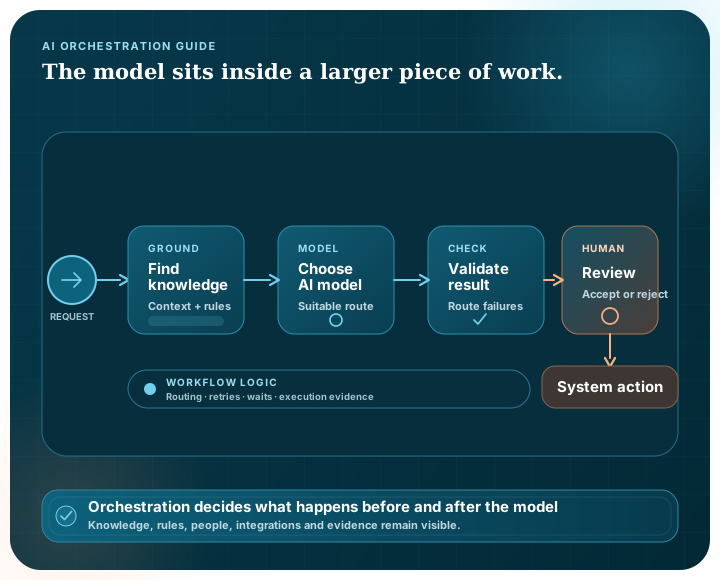
A useful AI workflow usually needs information from somewhere, rules about what may happen and a clear point where a person takes responsibility. Orchestration connects those parts and decides which service should handle each step.
Building blocks
Shape the request and create the structure needed by later steps.
Find approved organisational context before a model prepares a result.
Route each task to a configured local or external model suited to its role.
Run independent work in parallel or choose a path based on process data.
Pause before a consequential step so a person can review and decide.
Use approved service, search or data connections to obtain information or continue an action.
Related terms
| Term | Common emphasis | Useful evaluation question |
|---|---|---|
| AI workflow automation | A defined sequence of AI and non-AI steps | Can the process be versioned, reviewed and operated reliably? |
| AI orchestration | Coordination across models, knowledge, tools and decisions | Are routing, data paths and dependencies visible? |
| AI agent orchestration | Coordination of components that select or perform tasks | How much autonomy is allowed and where are its limits? |
| Human-in-the-loop AI | A person reviews, corrects or approves part of the process | Is human action meaningful, timely and recorded? |
Workflow design
State what the workflow should produce and who remains responsible for using it.
Identify every source, model and external service that can receive or return data.
Add validation, conditions and human approval where the process can become unsuitable or consequential.
Define what happens when a dependency fails and how a new workflow version reaches operation.
Test the complete workflow against representative tasks and explicit acceptance criteria.
Different models can suit different tasks, environments, costs or data paths. Having a choice is useful, but someone still needs to test the options and own the way they are run.
Not necessarily. An orchestration workflow can be tightly defined, include fixed branches and pause for people. The permitted autonomy is a design choice and should be explicit.
It means a person participates at a defined point, such as reviewing, correcting, approving or rejecting an output before the process continues.
Pūnaha provides visual, versioned workflows with triggers, retrieval, models, data validation, decisions, documents, connections, durable messages, waits, human work, evidence checkpoints and reusable subprocesses.
Use BPMN-based process modelling for repeatable operational paths and CMMN-based adaptive cases when evidence and judgement determine the next appropriate work. Both can connect to Pūnaha workflow modules and governed decisions.
Take the flexible AI workflow tour, or ask us to walk through a process from your own organisation.