
Accessibility
We want the Pūnaha website to work for as many people as possible
The public website is designed and tested to target the Web Content Accessibility Guidelines version 2.2 at Level AA across current responsive layouts.
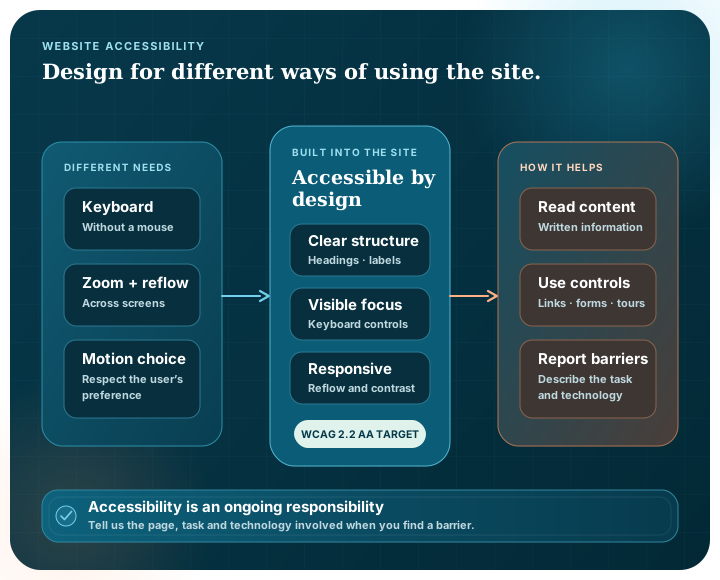
Accessibility built into the site
The site uses semantic HTML, a visible keyboard focus indicator, a skip link, labelled navigation, logical headings, a titled Microsoft Bookings frame, keyboard-operated product tour tabs and layouts that reflow on smaller screens.
Colours are selected for readable contrast, controls have practical target sizes, text can be zoomed and non-essential motion is reduced when the operating system requests it. The public site does not depend on JavaScript for access to its written content.
- Keyboard access. Navigation, links, booking controls, disclosures and tour controls are intended to work without a mouse.
- Clear structure. Landmarks, headings, lists, tables and labels provide programmatic meaning.
- Responsive reflow. Content reflows across mobile, tablet and desktop widths.
- Reduced motion. The site respects the user's reduced-motion preference.
Tell us if something is difficult to use
Accessibility is an ongoing responsibility. If you find a barrier, email info@punaha.com and describe the page, what you were trying to do and any assistive technology or browser involved. We will review the problem and respond with an accessible alternative where practical.
Hot Desk Consultancy Services Limited maintains this statement. It was last reviewed in August 2026.