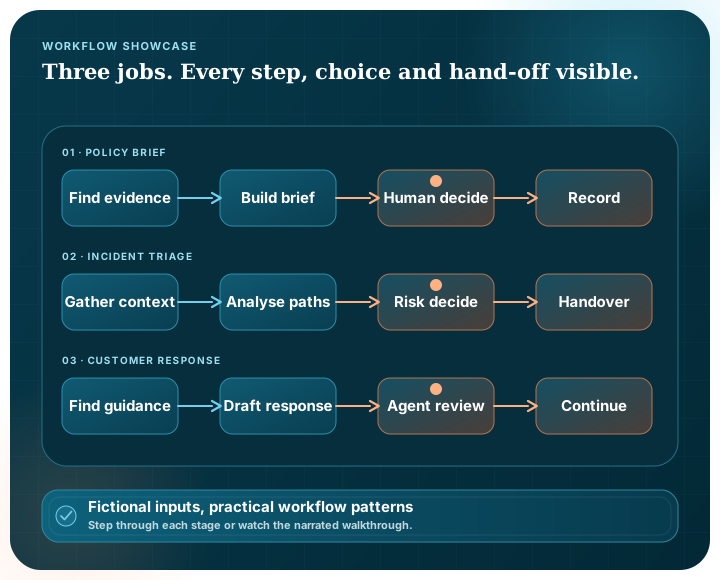
Interactive workflow showcase

Follow three governed AI workflows from request to recorded outcome

Explore each representative workflow stage by stage, then watch or download its narrated walkthrough. These fictional examples demonstrate product patterns rather than customer results.

Three complete walkthroughs

Inspect the information path, control point and execution record

Choose a workflow, move through its stages manually or play the walkthrough, and inspect what each step receives and produces.

Representative product showcase · Fictional data only. No information is sent or saved.

Workflow 01 · Knowledge and governance

Policy-to-decision brief

Turn a difficult internal-policy question into an evidence-linked brief that an accountable person can amend, approve or reject.

Hybrid searchParallel stagesHuman approvalExecution history
Pūnaha
Representative execution
DEMO-POLICY-024
Stage 1 of 7

Stage 01 · Intake

Frame the policy question

Request owner

Capture the intended decision, audience and information classification before retrieval begins.

Input

“What guidance applies if restricted information may be used with AI?”

Visible result

A structured request with purpose, audience and classification fields.

Capability shownDefined workflow inputs and durable state.

Stage 02 · Permission boundary

Confirm approved scope

Pūnaha controls

Resolve which tenant-aware knowledge collections this representative requester may use.

Input

Requester role, tenant and declared classification.

Visible result

Policy, information-security and privacy collections permitted; other material excluded.

Capability shownTenant-aware knowledge selection and visible data boundaries.

Stage 03 · Parallel retrieval

Find governing material

Hybrid retrieval

Search fictional policy, security and privacy sources in parallel, using both exact terms and semantic meaning.

Input

Structured question plus the approved collection list.

Visible result

Ranked extracts with source title, section and retrieval context.

Capability shownSemantic and hybrid search with parallel workflow stages.

Stage 04 · Evidence synthesis

Prepare the decision brief

Configured model

Create a structured brief that separates supported guidance, information gaps and questions requiring human judgement.

Input

The request and retrieved source extracts.

Visible result

Draft brief with evidence links and clearly marked unresolved questions.

Capability shownRetrieval-augmented generation using a configured local or external model.

Stage 05 · Condition

Check evidence coverage

Validation gate

Require each important statement to reference retrieved material; route unsupported text back for revision.

Input

Draft brief and its evidence references.

Visible result

Grounded brief after one illustrative statement is removed and regenerated.

Capability shownConditional routing, validation and controlled retry.

Stage 06 · Human control

Review and decide

Accountable owner

Inspect the brief and sources, then amend, approve or reject continuation.

Input

Validated brief, sources and unresolved questions.

Visible result

Representative decision: approved with a clarification recorded.

Capability shownHuman approval as a first-class workflow stage.

Illustrative controls only

Stage 07 · Controlled outcome

Publish the recorded result

Pūnaha workflow

Expose the approved structured brief to the next configured step while retaining its workflow version and execution trail.

Input

Approved brief and reviewer decision.

Visible result

A traceable decision aid ready for an approved continuation.

Capability shownVersioned workflows, durable execution and execution history.

Watch and keep

Policy-to-decision brief walkthrough

See retrieval, evidence preparation, validation and human approval in one traceable path.

Workflow 02 · Operations and resilience

Operational incident triage

Bring approved operational context together, branch on risk and create a clear handover without hiding uncertainty or failed dependencies.

REST integrationRead-only dataFailure pathRisk escalation
Pūnaha
Representative execution
DEMO-INCIDENT-117
Stage 1 of 7

Stage 01 · Intake

Capture the incident

Service owner

Structure the symptoms, affected service, time window and declared impact.

Input

Intermittent access failures reported for a fictional business application.

Visible result

Validated incident fields plus an explicit information boundary.

Capability shownControlled inputs and repeatable workflow initiation.

Stage 02 · Enrichment

Gather approved context

Configured connections

Request service status through generic REST and permitted configuration context through a read-only data step.

Input

Service identifier and incident time window.

Visible result

Status context plus a visible warning that one fictional dependency did not respond.

Capability shownDeveloper-configured REST, read-only data and explicit failure state.

Stage 03 · Parallel work

Analyse three paths

Pūnaha orchestration

Retrieve the runbook, find related resolved incidents and prepare a preliminary impact summary at the same stage.

Input

Incident report and available enrichment context.

Visible result

Three labelled branch results with their own source and completion state.

Capability shownParallel stages combining retrieval and a configured model.

Stage 04 · Merge

Build the triage package

Merge stage

Combine branch results without hiding missing evidence or conflicting signals.

Input

Runbook extracts, related records and preliminary impact summary.

Visible result

One review package with sources, uncertainty and missing-context markers.

Capability shownMerged outputs with inspectable provenance.

Stage 05 · Risk branch

Choose the response path

Conditional routing

Evaluate declared impact and information completeness against the workflow's configured routing rules.

Input

Triage package, impact level and dependency state.

Visible result

High-risk escalation route selected; missing-context warning retained.

Capability shownConditions that choose a visible, governed path.

Stage 06 · Human control

Approve the handover

Incident lead

Review the sources and uncertainty, correct the summary and select the accountable handover path.

Input

High-risk triage package with a dependency warning.

Visible result

Representative decision: escalate with the warning preserved.

Capability shownMeaningful human review before consequential continuation.

Illustrative controls only

Stage 07 · Handover

Continue with a clear record

Configured REST step

Send only the approved handover fields to the surrounding incident service and retain how the package was formed.

Input

Approved escalation package.

Visible result

Controlled downstream continuation plus complete execution history.

Capability shownApproved system continuation and durable audit context.

Watch and keep

Operational incident triage walkthrough

Follow a fictional incident through enrichment, parallel analysis, risk routing and accountable handover.

Workflow 03 · Service and model choice

Controlled customer response

Retrieve approved guidance, route work according to sensitivity and keep a service agent responsible for the response that continues.

Sensitivity routingLocal or external modelsConflict gateAgent review
Pūnaha
Representative execution
DEMO-SERVICE-308
Stage 1 of 7

Stage 01 · Intake

Receive the enquiry

Service queue

Accept only the fields the implementation permits and record the responsible queue and product area.

Input

Fictional enquiry about changing an account arrangement.

Visible result

Structured service request with permitted context only.

Capability shownDefined workflow inputs and ownership metadata.

Stage 02 · Sensitivity

Classify and route

Routing condition

Use topic, declared sensitivity and urgency to choose the permitted model and review path.

Input

Structured enquiry and configured routing rules.

Visible result

Sensitive route selected; external model path excluded.

Capability shownVisible conditions and model-routing policy.

Stage 03 · Retrieval

Find approved guidance

Hybrid retrieval

Retrieve relevant fictional product guidance, service policy and troubleshooting material.

Input

Enquiry topic plus the approved support collection.

Visible result

Ranked extracts with visible source title and section.

Capability shownTenant-aware semantic and hybrid knowledge retrieval.

Stage 04 · Draft

Prepare a response

Configured local model

Use the enquiry and retrieved guidance to prepare proposed wording for an agent to review.

Input

Permitted enquiry fields and source extracts.

Visible result

Draft response with source references; no automatic send action.

Capability shownTask-specific model choice and retrieval-augmented drafting.

Stage 05 · Conflict gate

Check completeness and conflict

Validation condition

Look for missing fields and disagreements in the retrieved guidance before the draft reaches an agent.

Input

Draft, evidence references and retrieved metadata.

Visible result

Conflicting effective dates highlighted; mandatory review route selected.

Capability shownValidation and transparent exception routing.

Stage 06 · Human control

Agent reviews the draft

Service agent

Inspect the question, sources, conflict and wording; then amend, approve, reject or escalate.

Input

Draft response with the effective-date conflict highlighted.

Visible result

Representative decision: date clarified and corrected response approved.

Capability shownHuman amendment and approval before downstream use.

Illustrative controls only

Stage 07 · Controlled continuation

Continue the approved response

Configured service connection

Pass only the approved response fields to the surrounding service and retain the complete decision trail.

Input

Agent-approved corrected response.

Visible result

Controlled continuation with model route, sources, amendment and decision recorded.

Capability shownApproved REST continuation and execution history.

Watch and keep

Controlled customer response walkthrough

See sensitivity-aware model routing, grounded drafting, conflict handling and agent approval.

Capability coverage

The three workflows reveal different parts of the same governed system

Enterprise knowledge

Use tenant-aware semantic or hybrid retrieval to bring approved organisational context into a workflow.

Model choice

Route a task to a configured local or external deployment according to its purpose and permitted data path.

Workflow logic

Run parallel stages, merge results, validate state and choose a path through explicit conditions.

Human judgement

Pause at a meaningful control point so a responsible person can amend, approve, reject or escalate.

System connections

Continue through developer-configured REST or read-only data steps with an agreed field boundary.

Operational history

Keep the workflow version, stage state and recorded decision available for later inspection.

Workflow showcase questions

Are these live customer workflows?

No. Every input, document title, execution identifier and result shown here is fictional and representative. The showcase demonstrates product patterns and does not claim customer adoption or outcomes.

Do the walkthroughs send or save my information?

No. The public interactions run in the browser with bundled fictional content. They do not call a live AI service, authenticate a user or submit information.

Can I keep the videos and scripts?

Yes. Each workflow includes direct downloads for its MP4 video, narration script and caption file.

Would a real implementation use the same decisions?

Not automatically. A real implementation must define its own information sources, permissions, model routes, validation rules, approvers, downstream connections and operating responsibilities.

Bring a process that needs a clearer information and decision path

A private demonstration can map your intended sources, model choices, branches, approval points and implementation boundary.